In the manufacturing industry, efficiency is paramount. Custom web dashboards are transforming how companies monitor production in real-time, optimizing workflows and enhancing productivity. By integrating technology into everyday processes, businesses can streamline operations, reduce downtime, and make informed decisions.
Table of Contents
- Understanding Custom Web Dashboards
- Benefits of Real-Time Production Monitoring
- Implementing Web Dashboards in Manufacturing
- Best Practices for Dashboard Design
- FAQ
- Conclusion
Understanding Custom Web Dashboards
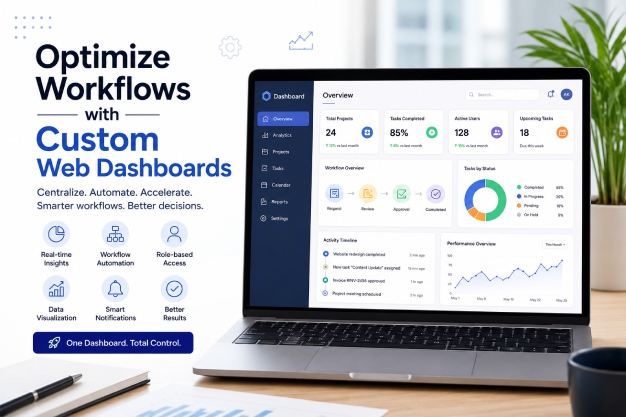
Custom web dashboards are tailored interfaces that display critical data and metrics in real-time. They are designed to provide insights into various aspects of manufacturing operations, from machine performance to inventory levels. These dashboards aggregate data from multiple sources, offering a comprehensive view of the production environment.
Unlike off-the-shelf solutions, custom dashboards are built to meet the specific needs of a business. They can be integrated with existing systems, such as ERP and CRM platforms, allowing for seamless data flow and enhanced visibility. This integration is crucial for companies aiming to achieve digital transformation in their operations.
The use of technologies such as PHP, React, and Node.js in building these dashboards ensures scalability, reliability, and user-friendly interfaces. This technological foundation supports long-term growth and adaptability in the ever-evolving industrial landscape.
Benefits of Real-Time Production Monitoring
Real-time production monitoring through custom web dashboards offers numerous advantages for manufacturers. Here are some key benefits:
- Improved Efficiency: By accessing live data, manufacturers can quickly identify bottlenecks and inefficiencies, enabling prompt corrective actions.
- Enhanced Decision Making: Dashboards provide actionable insights, allowing managers to make informed decisions based on current conditions rather than historical data.
- Increased Productivity: Real-time monitoring helps in optimizing resource allocation and scheduling, leading to higher output.
- Reduced Downtime: Predictive analytics can forecast potential failures, allowing for preventative maintenance and reducing unplanned downtime.
- Quality Control: Continuous monitoring ensures that quality standards are maintained throughout the production process.
These benefits collectively lead to a more agile and responsive manufacturing operation, capable of adapting quickly to changing market demands.
Implementing Web Dashboards in Manufacturing
Implementing custom web dashboards in a manufacturing setting involves several strategic steps. First, it is essential to clearly define the objectives and key performance indicators (KPIs) that the dashboard will track. This ensures that the dashboard aligns with the business goals and delivers relevant insights.
Next, selecting the right technology stack is crucial. Technologies such as ASP.NET, Laravel, and cloud-based solutions offer robust platforms for building scalable and secure dashboards. Integration with existing systems should also be a priority to ensure seamless data aggregation and reporting.
A collaborative approach involving IT teams, production managers, and end-users is essential during the development phase. This ensures that the dashboard meets the practical needs of all stakeholders and enhances user adoption.
Key Steps in Implementation
- Define Objectives and KPIs
- Select Technology Stack
- Integrate with Existing Systems
- Collaborate with Stakeholders
- Test and Iterate
Once implemented, continuous feedback and iteration are vital to refine the dashboard and maximize its impact on production monitoring.
Best Practices for Dashboard Design
Designing an effective custom web dashboard requires careful consideration of user experience and functionality. Here are some best practices:
- User-Centered Design: Understand the needs of the end-users and design the dashboard to be intuitive and easy to navigate.
- Data Visualization: Use charts, graphs, and other visual aids to present data clearly and concisely.
- Responsive Design: Ensure the dashboard is accessible on various devices, enabling users to monitor production on-the-go.
- Security Measures: Implement robust security protocols to protect sensitive data from unauthorized access.
- Scalability: Design the dashboard to accommodate future growth and additional data sources.
By adhering to these practices, companies can develop dashboards that not only meet current needs but are also adaptable to future technological advancements.
FAQ
What industries benefit most from custom web dashboards?
While all industries can benefit, manufacturing, logistics, and healthcare often see the most significant improvements in efficiency and decision-making.
How long does it take to implement a custom web dashboard?
The timeline varies based on complexity, but typically, implementation can range from a few weeks to several months. Planning and stakeholder collaboration are key to timely deployment.
Can existing systems be integrated with custom web dashboards?
Yes, custom dashboards can be designed to integrate seamlessly with existing ERP, CRM, and other systems, ensuring a unified data flow.
What are the cost considerations for developing custom dashboards?
Costs depend on the complexity and scope of the project, including technology stack, integration requirements, and design elements. A detailed assessment is recommended for accurate budgeting.
Conclusion
Custom web dashboards are powerful tools for optimizing manufacturing workflows. By enhancing real-time production monitoring, these dashboards empower businesses to make data-driven decisions, improve efficiency, and prepare for future challenges. As a strategic technology partner, Gravity Effects is committed to helping organizations achieve digital excellence through innovative solutions.
Ready to enhance your manufacturing operations? Contact Gravity Effects to explore how custom web dashboards can transform your business.
Related Reading
- Optimizing Manufacturing Web Portals for Supplier Collaboration
- AI-Powered Sustainability Dashboards for Manufacturing
- Dynamic Data Visualization for Manufacturing Dashboards
Discover more from GravityEffects
Subscribe to get the latest posts sent to your email.