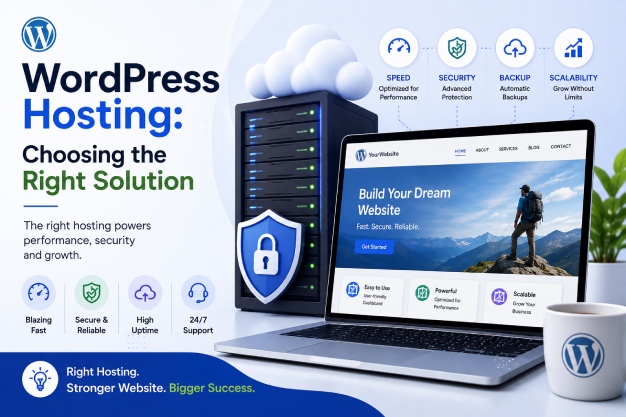
Choosing the right WordPress hosting is crucial for any business aiming to maximize their website’s potential. With a plethora of options available, understanding what each type of hosting offers can significantly impact your site’s performance, security, and scalability. In this article, we’ll explore the essentials of WordPress hosting, discuss various hosting types, and guide you in selecting the best solution for your needs.
Understanding WordPress Hosting
WordPress hosting is specifically optimized to meet the performance and security needs of WordPress sites. It encompasses a variety of services designed to enhance the functionality and reliability of WordPress installations. Whether you run a blog, an eCommerce platform, or a corporate website, the right hosting can make a significant difference.
Key Features of WordPress Hosting
WordPress hosting typically includes features such as one-click installations, automatic updates, enhanced security measures, and specialized support. These cater specifically to WordPress, ensuring seamless functionality and ease of use.
- One-Click Installations: Simplifies the setup process, allowing you to launch your site quickly.
- Automatic Updates: Keeps your WordPress core, themes, and plugins up-to-date, enhancing security.
- Enhanced Security: Provides specific security protocols aimed at WordPress vulnerabilities.
- Specialized Support: Offers support from experts familiar with WordPress-specific issues.
Types of WordPress Hosting
Understanding the different types of WordPress hosting is essential to making an informed decision. Each type caters to different needs and budgets, providing varying levels of performance, scalability, and support.
Shared WordPress Hosting
Shared hosting is the most budget-friendly option and is ideal for beginners or small websites. In this setup, multiple websites share a single server’s resources. While cost-effective, it may not offer the best performance during traffic spikes.
Managed WordPress Hosting
Managed hosting offers a hands-off experience, perfect for those who prefer to focus on content rather than server management. It includes automatic updates, backups, and enhanced security. While more expensive than shared hosting, the convenience and performance benefits are often worth the investment.
VPS WordPress Hosting
Virtual Private Server (VPS) hosting provides more control and resources than shared hosting. It’s an excellent option for websites with moderate traffic that require better performance and customization options.
Dedicated WordPress Hosting
For high-traffic websites requiring maximum control and resources, dedicated hosting is the top choice. It offers an entire server dedicated to your site, allowing for optimal performance and customization. However, it comes at a higher cost and requires technical expertise to manage effectively.
Factors to Consider When Choosing WordPress Hosting
When selecting a WordPress hosting provider, consider several factors to ensure you choose the best fit for your business needs.
Performance and Speed
Your hosting provider should offer fast loading times and reliable performance. Speed is essential for user experience and SEO rankings. Look for hosts that use SSD storage, have a content delivery network (CDN), and offer caching solutions.
Security Features
Security is crucial for protecting your website and customer data. Ensure your host provides features like SSL certificates, firewall protection, and regular backups.
Scalability
Your hosting solution should accommodate your website’s growth. Choose a provider that offers easy upgrades and can handle increased traffic as your business expands.
Support and Customer Service
Reliable support is vital. Select a host that offers 24/7 customer service with knowledgeable WordPress experts ready to assist you with any issues.
FAQs About WordPress Hosting
What is the difference between shared and managed WordPress hosting?
Shared hosting is cost-effective, with resources shared among several websites, while managed hosting offers specialized WordPress services, better performance, and added features like automatic updates and backups.
How does WordPress hosting impact website speed?
WordPress hosting impacts speed by providing optimized server environments, SSD storage, and caching solutions that enhance loading times and user experience.
Is it necessary to have WordPress-specific hosting?
While not necessary, WordPress-specific hosting offers optimized features that enhance performance, security, and ease of use, making it a preferred choice for many websites.
Can I easily switch WordPress hosts if needed?
Yes, migrating your WordPress site to a new host can be straightforward, especially if your new host offers migration services. Always back up your site before transferring.
Conclusion
Choosing the right WordPress hosting solution is pivotal for your website’s success. By understanding the different types of hosting and considering factors like performance, security, and support, you can make an informed decision that aligns with your business goals. Whether you’re a small startup or a growing enterprise, the right hosting can provide the foundation for your digital growth.
Ready to optimize your WordPress site? Contact Gravity Effects to explore the best hosting solutions tailored to your business needs. Our experts are here to guide you through every step of your digital transformation journey.
Related Reading
Discover more from GravityEffects
Subscribe to get the latest posts sent to your email.